Category
Computer Repair Shop in Midtown NYC Drone Repair Game Console Repair iPhone Repair Laptop Repair MacBook Repair Phone Repair Tablet Repair in Midtown NYC Watch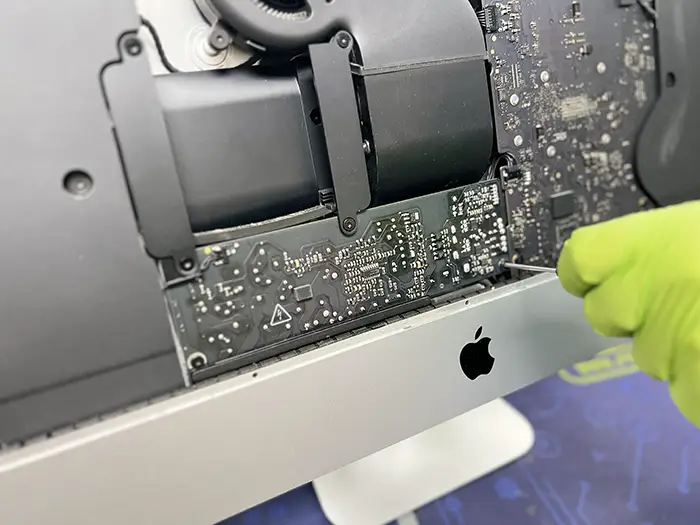 Computer Repair Shop in Midtown NYC
Struggling with a slow iMac? Stuck at the Apple logo right when you need to get work done? If your Apple desktop is freezing, restarting, or not powering on at all, you’re not alone, and you’re not out of options. Quick Fix by iFix offers iMac repair in Midtown NYC for the faults inside the machine: a slow or failed hard drive, macOS that won’t load, a dead power supply, a loud fan or overheating, and logic board problems. We are an independent repair shop, not Apple.
We repair iMacs that are slow, won’t boot, shut off, overheat or need the hard drive swapped for an SSD. Diagnostic $75, credited toward the repair, then a quote you approve before any repair. Most repairs have a 30-day limited warranty.
Get an iMac repair quote 212-810-6432Cracked glass, lines, a dim or dark display? Those jobs have their own page: iMac screen repair in NYC. This page covers everything else inside your iMac.
Located steps from the Empire State Building, we help local professionals, students, and creatives across Midtown Manhattan get back up and running, with a quote before any work and a straight answer on whether the repair is worth it.
iMac Problems We Diagnose and Repair
When your iMac begins acting out of the ordinary, it’s rarely random. Most of the time, symptoms point directly to failing components or outdated configurations. Some of the most common issues we repair include:
- iMac not powering on, or turning off by itself
- Unresponsive desktop or frozen screens
- System running unusually slow, spinning beach ball on every click
- Stuck on the Apple logo, a progress bar or a folder with a question mark
- Loud fan or shutdowns when the iMac gets hot
- Software crashes and boot-up errors
- Inconsistent performance after an update or upgrade
We find the cause before we replace anything. If the repair makes sense, you get a quote for it. If an upgrade is the better buy, we’ll walk you through your options. And if your iMac has reached the end of its life, we’ll tell you that before you spend money on it.
Hard Drive to SSD, Power Supply, Fan and Logic Board Repair
Slow or won’t boot. On many Intel iMacs the cause is a worn-out spinning hard drive or Fusion Drive. Replacing it with an SSD and reinstalling macOS is often the fix, and if the old drive still reads we can copy your files to the new one.
No power or random restarts. An iMac that shows no sign of life, clicks off, or restarts on its own may have a failed internal power supply. We test it with a multimeter before we quote a replacement.
Fan noise and overheating. A loud fan, or an iMac that shuts down under load, usually points to dust in the cooling path or a failing fan or temperature sensor. Cleaning and fan replacement are quoted separately.
Logic board. If the power supply and storage test fine, the fault may be on the logic board. We tell you whether a board repair or replacement makes sense for the age of your model.
macOS problems. Kernel panics, a stuck update or apps that crash after an upgrade can be software. We reinstall or upgrade macOS to the latest version your model supports and try to keep your files in place.
Walk-In Apple iMac Computer Repair in Midtown NYC
Some repair services ship an iMac out before anyone looks at it. With us you carry it in, talk to the person who will open it, and leave with a clear next step.
Quick Fix by iFix offers Apple iMac computer repair right here in Midtown NYC, without sending your machine anywhere else. Our team works in-house, so your iMac stays in our shop from check-in to pickup, and we run diagnostic software on it before we quote.
We work with logic boards, power supplies, cooling systems, storage and RAM configurations on Intel iMacs, and we look at Apple silicon (M1 and later) iMacs too. On those models the storage and memory are part of the board, so the options are narrower and we explain them in the quote.
How Much Does iMac Repair Cost?
Online price lists for Apple iMac repair rarely match the model and fault on your desk, so we price the actual job.
At our Midtown Manhattan location, every repair starts with a diagnostic. You’ll receive a clear quote after we assess the issue, with no pressure and no guesswork. iMac repair cost depends on the model, the part and the specific damage or performance problem, but you’ll know exactly what you’re paying for, and roughly how long it will take, before we begin.
What We Can Fix and Improve
You don’t need to replace your entire computer just because one part fails. Our team handles both repairs and upgrades that help extend the life of your machine. Common services include:
- Power supply troubleshooting and replacement
- Logic board diagnostics and repairs
- iMac hard drive replacement with an SSD
- iMac memory upgrade
- Upgrade Mac OS to the latest compatible version
- Data recovery from non-booting systems
- Fan and cooling system repairs
- GPU fault diagnostics
- Internal dust cleaning and temperature control
We also help customers who need an iMac RAM upgrade for more efficient multitasking, or who want to improve system responsiveness by switching to solid-state drives. You don’t need to replace your entire setup to get better performance; often, a few key improvements go a long way.
iMac Service in New York City, at Our Midtown Store
An iMac often runs a design studio, a freelance business or a home office, and a 27-inch desktop is not easy to carry across town twice. We keep the visit simple: one drop-off, a call with the diagnosis and quote, and one pickup.
Drop off your iMac on your lunch break or pick it up after work. Our shop is on the 15th floor at 347 Fifth Ave, near major transit lines and the Empire State Building. Bring the power cable and your login password if you want us to test macOS, or tell us at the counter if the drive must stay untouched.
Can’t visit in person? We also offer mail-in repair with the same level of precision and care.
Already Diagnosed Elsewhere? Get a Second Opinion.
Some customers come to us after being told the only option is a new logic board or a new iMac. Sometimes that is true. Sometimes the fault is a single part, such as the power supply or the drive, and the rest of the machine is fine.
If you need to repair iMac issues others have given up on, bring it in. We test the power supply, storage and board in order, and our experience gives us insight into when a component needs replacement versus when it can be recovered.
Bring the earlier diagnosis or quote with you. It tells us what was already tested, and we can show you where our findings agree or differ.
What About Your Data?
We try to keep your data on every iMac repair, but a failing drive can lose files at any time. If the iMac still starts, back it up first with Time Machine or a copy to an external drive. If it won’t boot, we can try to copy your files before we replace the drive.
Recovery from a dead or damaged drive is a separate job, quoted after the diagnostic; see data recovery in NYC. We handle your drive with your privacy in mind.
How It Works at Our Midtown Store
No appointment is needed. Bring the iMac and its power cable to the store, or send a request first if you want to describe the problem before you carry it in:
- Walk in or send a request with the form on this page
- Diagnostics: we check the drive, power supply, fan and board and tell you what failed
- Honest quote: price and timing depend on the model and part, and nothing is done until you approve
- Repair and test: we run the iMac under load before you pick it up
- Pickup, with a 30-day limited warranty on most repairs
Need an Apple iMac fix? Walk in or request a quote below.
Why Quick Fix by iFix?
Here’s what sets us apart:
- Located in Midtown Manhattan, near the Empire State Building
- 15+ years of experience repairing computers, iMacs included
- Repair knowledge that goes past swapping parts, including logic board work
- Walk-in service and a quote before any work
- 4.9 ★ Google rating and 900+ devices repaired in the last year
- Transparent pricing and real solutions, with no factory resets unless absolutely necessary
- Independent repair shop, not affiliated with Apple
Need iMac Repair in Midtown NYC? Let’s Talk
If your iMac has slowed down, stopped booting or shuts off on its own, back up what you can and bring it in for a diagnostic. You will know what failed and what the fix costs before any work starts.
We’ll give you clear answers, a solid repair plan, and a timeline that respects your time and your machine.
Call now or walk in, no appointment needed. Estimates are available.