Category
Computer Repair Shop in Midtown NYC Drone Repair Game Console Repair iPhone Repair Laptop Repair MacBook Repair Phone Repair Tablet Repair in Midtown NYC Watch MacBook Repair
Quick Fix by iFix is ready to repair any water damage to your device at our Midtown Manhattan store, right across the Empire State Building: coffee, water, wine or soda on the keyboard, a MacBook that won’t turn on after a spill, keys or a trackpad that stopped working. There is even a convenient mail-in service provided. You may prefer the walk-in store option.
We repair MacBook Pro and MacBook Air laptops after a spill: MacBooks that won’t turn on or charge, dead or sticky keyboards and trackpads, and screens with lines or no picture. Diagnostic $99, credited toward the repair, then a quote you approve before any repair. Liquid damage repairs have no warranty.
Get a water damage quote 212-810-6432Spilled something on your MacBook? Do this now:
- Shut it down: hold the power button until the screen goes dark.
- Unplug the charger and disconnect all peripherals.
- Don’t charge it or turn it back on to test it.
- Tilt it keyboard-down, open like a tent, so the liquid can drain out.
- Skip the bag of rice: it doesn’t dry the inside of a MacBook.
- Don’t use a hair dryer or any other heat.
- Bring it in soon: corrosion keeps spreading while liquid sits on the logic board.
MacBook Water Damage Repair in NYC, Across From the Empire State Building
If your computer or any other device becomes damaged by a spill and needs repair, you can count on this team to open it, find what the liquid reached and tell you what can be fixed before any work starts. If you need help fixing your device, do not hesitate to contact this company. Repairing your device is a business that is taken seriously. We work with knowledge, the right tools and caring professionals who strive to make your life easier, and we test with a multimeter and diagnostic software instead of guessing. From June to October 2026 the five iFix stores, Quick Fix included, took in 30+ MacBooks with liquid damage, 10+ of them at this Midtown store.
Signs of Liquid Damage on a MacBook
A MacBook that still works right after a spill can fail days or weeks later, because the residue from coffee, soda or juice keeps corroding the board. The usual signs:
- The MacBook won’t turn on, or turns on with no picture
- It won’t charge, or shuts down on battery
- Keys stick, stop working or type on their own
- The trackpad won’t click or the cursor jumps
- The fan runs loud, or the speakers crackle
What MacBook Pro Water Damage Repair Involves
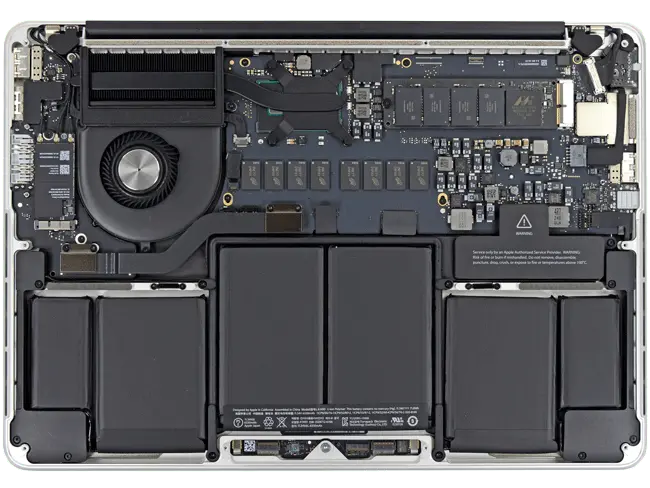
We open the case, disconnect the battery and check the logic board, keyboard, trackpad, battery and display for liquid and corrosion. Then we clean the affected parts and test the board. Depending on what failed, the repair can be cleaning and board-level repair, or a new keyboard, trackpad, battery or display. The quote comes after the diagnostic and depends on the model and the part; you decide before we do anything. The same process applies to the MacBook Air water damage repair, and to Windows laptops on our laptop water damage repair page.
Not every MacBook comes back after a spill. If the logic board is too corroded to repair, we tell you before any work. We try to keep your data, but we can’t promise it; if you need your files, data recovery is quoted separately after the diagnostic. If the MacBook still runs, back it up first.
Apple’s standard limited warranty excludes liquid damage. AppleCare+ covers accidental liquid damage with a service fee, so check your coverage before you decide.
How It Works at Our Midtown Store
- Walk in or send a request with the form on this page. Just inform the staff which device needs repair. Tell us what spilled on it and when, and bring the charger.
- Diagnostic: we open the MacBook and find what the liquid reached.
- Quote: you get the price and the timing, and nothing is done until you approve.
- Repair and test: power, charging, keyboard, trackpad, display and sound before pickup.
- Pickup. Liquid damage repairs have no warranty.
We offer a wide range of Macbook repair services. Allow the professionals to repair your device instead of opening it at home: a spill on the logic board is not a job for a hair dryer.