Category
Computer Repair Shop in Midtown NYC Drone Repair Game Console Repair iPhone Repair Laptop Repair MacBook Repair Phone Repair Tablet Repair in Midtown NYC Watch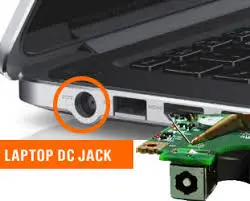 Laptop Repair
A Dell that stops charging becomes a dead laptop within a few hours, usually in the middle of a workday or a class. Quick Fix by iFix offers Dell charging port and power jack repair in Midtown NYC, restoring power and reliability to your laptop.
We fix Dell laptops that will not charge: worn or loose DC power jacks, damaged USB-C ports, broken charger pins and cables, and faults in the charging circuit on the board. Diagnostic $75, credited toward the repair, then a quote you approve before any repair. Most repairs have a 30-day limited warranty.
Get a Dell charging port quote 212-810-6432If your device won’t charge, only powers on when the cord is angled just right, or charges intermittently, the issue often lies within the power input itself. Our technicians find out whether it is the charger, the port or the board before any part is ordered, so you pay only for the repair the laptop needs. From June to October 2026 the five iFix stores, Quick Fix included, took in 90+ laptops with charging or power problems.
Dell Laptop Not Charging? Charger, Port or Board
A Dell that will not charge usually has one of three problems, and each one is fixed differently:
- The charger or its cable. Dell barrel chargers have a thin center pin that tells the laptop which adapter is plugged in. If that pin is bent or broken, or the wire inside the cable fails, the laptop may warn that the AC adapter type cannot be determined, charge very slowly, or show “plugged in, not charging”. A new Dell adapter of the right wattage fixes this, and the laptop itself needs no repair.
- The DC power jack or USB-C port. A worn, loose or cracked jack, or a USB-C port with bent contacts, cuts power whenever the plug moves. On many Dell Inspiron and Latitude models the DC jack sits on a short cable and is replaced as a part; on other models, and on most USB-C ports, it is soldered to the board.
- The charging circuit on the board. If the charger and the jack test fine and the laptop still will not charge, the fault is on the motherboard: a charging chip, a fuse, or a part damaged by a power surge or a spill. This is quoted as a board repair after the diagnostic.
A worn-out battery can also refuse to charge even when the port is fine. We check it as part of the same diagnostic.
Common Signs of a Dell Charging Port Problem
If your laptop only charges at a certain angle or randomly disconnects, it’s likely more than just a loose cable. A wobbly port, heat while charging, or visible connector movement often points to internal damage. Sometimes the port looks fine but has detached from the motherboard due to wear or impact.
A loose jack that keeps losing contact can burn the connector and the board around it, which turns a simple part swap into a board repair. If your Dell charging port is not working properly, bring the laptop in early.
Try This Before You Bring It In
- Plug the charger into a different wall outlet and check that the light on the adapter or the plug comes on.
- Look at the tip of a barrel charger: the center pin should be straight and intact.
- If you have another Dell charger of the same or higher wattage, try it. If the laptop charges with it, the problem is your adapter, not the port.
- On a USB-C Dell, use a Dell or laptop USB-C charger rather than a phone charger, and look for lint or bent contacts in the port. Do not dig into the port with anything metal.
If the laptop still does not charge, or charges only when you hold the plug at an angle, bring it in together with the charger.
What Causes a Broken or Loose Charging Connection?
Daily wear, sudden tugs, and general use can loosen a laptop charging port over time—especially in models with soldered connectors. Power surges, poor contact, or liquid spills often make things worse. In some cases, the port breaks off the board entirely and has to be soldered back on or replaced.
What feels like a loose charging port is sometimes fractured solder or damage to nearby components. We test the charger, the jack and the power path with a multimeter and diagnostic software to find the problem and fix it at the source.
Dell Charging Port Repair Cost: What the Quote Depends On
Not every power issue needs a full port replacement. The cost of Dell laptop charging port repair depends on what’s really going on, and we’ll explain it clearly before any repair begins.
After the diagnostic you get a quote for your model: a bad adapter is replaced, a DC jack on a cable is a part swap, a port soldered to the board takes more work, and a charging circuit fault is quoted as a board repair. Our estimates include labor, parts, and any additional testing—no vague add-ons or surprise surcharges. Walk-ins are welcome, or you can call ahead to set up a time.
What If Dell Charging Port Repair Isn’t Possible?
If repair isn’t an option, we proceed with a full Dell charging port replacement using model-specific parts. The damaged connector is removed, the board is cleaned, and a new port is installed to match your device’s exact specs.
After installation, we test voltage flow, power stability, and connection strength before reassembly. Timing depends on part availability, and you get it with the quote.
Can You Fix a Dell Charging Port Yourself?
Replacing a charger is a do-it-yourself job. Replacing the jack or port usually is not: on most Dell models it means taking off the bottom cover, disconnecting the battery and sometimes removing the fan or the whole board, and a port soldered to the board needs soldering equipment and practice. A slip during disassembly can tear a ribbon cable or short a part on the board.
If a home repair has already gone wrong, bring the laptop in with any loose screws and parts and tell us what was done. We include it in the diagnostic.
How It Works at Our Midtown Store
- Walk in with the laptop and its charger, or send a request first. We need the charger to tell an adapter fault from a port fault.
- Tell us what happens when you plug in: no light, charging only at an angle, a “not charging” message, or a laptop that shuts off when unplugged. Back up your files if the laptop still turns on, and bring your Windows login so we can test it after the repair.
- We run the diagnostic and tell you the cause, the part it needs and the timing.
- You approve the quote before any repair. If the part is not in stock, we tell you when it will arrive.
- We test charging with your adapter before you pick the laptop up.
Dell Charging Port Repair in Midtown NYC
When you’re searching for Dell charging port repair in Midtown Manhattan, convenience matters. That’s why we offer walk-in service with no appointment needed. Located just steps from the Empire State Building, our shop is easily accessible for commuters, office professionals, students, and travelers alike. If your Dell has other problems as well, see our Dell laptop repair page. For HP, Lenovo, ASUS and other brands, see laptop charging port repair or all laptop repair in Midtown NYC.
Why Midtown Dell Owners Choose Quick Fix
- Precise diagnostics. We identify the real issue before starting any repair.
- Board-level repairs. We replace soldered ports and repair charging circuits, not just swap parts.
- Walk-in friendly. Conveniently located in Midtown Manhattan
- Clear quotes. The price and timing are in the quote you approve.
- 15+ years of laptop repair in Manhattan.
Ready to Get Your Dell Charging Port Fixed?
If the plug feels loose, the laptop runs only on battery, or it charges at one angle only, bring it in with the charger before the jack or the board gets worse.
Visit our location near the Empire State Building or request a quote. No appointment is needed—walk-ins welcome during business hours.