
Category
Computer Repair Shop in Midtown NYC Drone Repair Game Console Repair iPhone Repair Laptop Repair MacBook Repair Phone Repair Tablet Repair in Midtown NYC Watch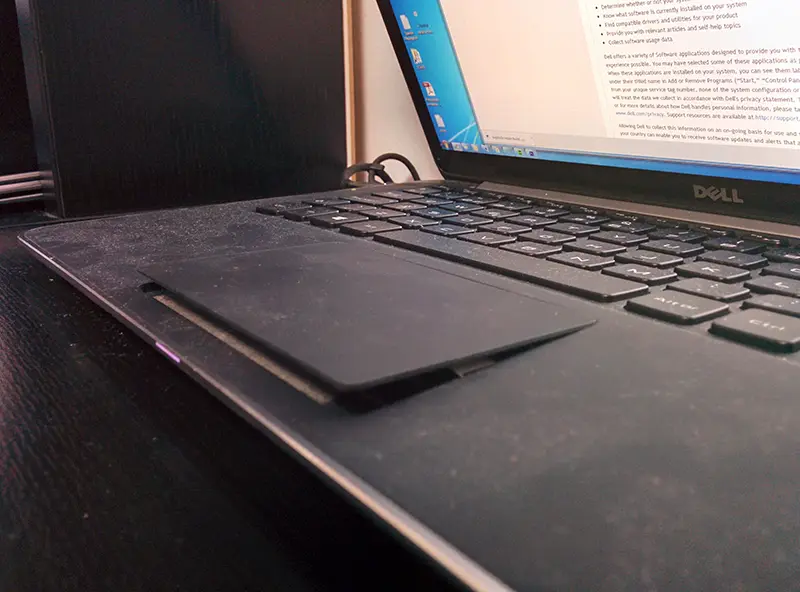 Laptop Repair
When your Dell laptop’s touchpad stops responding, lags, or gets physically damaged, your work stops with it. For professionals on the go, students facing deadlines, or travelers staying connected, even small malfunctions can cause major disruption.
We fix Dell touchpads that are dead, jumpy or will not click: settings and driver problems, worn pads, loose ribbon cables, and swollen batteries pushing the pad up. Diagnostic $75, credited toward the repair, then a quote you approve before any repair. Most repairs have a 30-day limited warranty.
Get a touchpad repair quote 212-810-6432Quick Fix by iFix offers Dell touchpad repair and trackpad replacement at our store on Fifth Avenue near the Empire State Building. We find out whether the problem is a setting, a driver, the pad itself, its ribbon cable or the battery underneath it, and we quote the repair before any work starts. From June to October 2026 the five iFix stores, Quick Fix included, took in 10+ laptop touchpad repairs.
Dell Touchpad Not Working? Common Symptoms
If your Dell touchpad is not working, you’re definitely not alone. Many users experience issues like:
- Inconsistent or jumpy cursor movement
- Taps or clicks not registering
- Physical buttons failing intermittently
- Drag-and-drop actions cutting out
- Cursor freezing during use
Sometimes, the problem is caused by a worn touchpad or a damaged click mechanism. Other times, it’s linked to a swollen battery or a driver issue affecting input response. Start with the checks below; they cost nothing and solve the software cases.
Try This First: Touchpad Checks You Can Do at Home
- Check the touchpad key: many Dell keyboards have a function key with a touchpad icon, sometimes pressed together with Fn, that turns the pad off. Press it once and test again.
- Check Windows settings: open Settings, search for Touchpad, and make sure the touchpad switch is on. Some laptops also turn the pad off while a mouse is connected.
- Update the driver: run Windows Update, or download the touchpad driver for your exact model from Dell Support using the service tag on the bottom of the laptop. Restart afterward.
- Shut down fully: unplug the charger, shut the laptop down, and power it back on. A frozen driver often comes back after a full restart.
If the touchpad still does not respond after these checks, or it stopped working after a drop or a spill, the cause is likely hardware.
Hardware Causes of Dell Touchpad Problems
Issues with touchpads often involve hardware faults or software conflicts. When the checks above don’t help, these are the usual causes:
- Battery swelling: On many laptops the battery sits right under the touchpad. A swollen battery pushes the pad up, so it looks raised, clicks on its own, or is difficult to click. This is a safety issue: stop using the laptop, do not charge it, and do not press the pad down. Bring it in and the battery is replaced first; see our laptop battery replacement page.
- Failed pad or ribbon cable: Repeated use can reduce button sensitivity over time, and a loose or torn ribbon cable can cut the pad out completely. We test the pad and its cable before we order a part.
- Moisture or spills: Even minor liquid exposure can disrupt the touchpad or cause short circuits on the board. Liquid damage repairs have no warranty.
- Driver or OS conflicts: Sometimes the issue isn’t physical—outdated or corrupted drivers can interfere with normal function.
Touchpad Repair Without Shipping Your Laptop
Our Dell trackpad repair and replacement services are built for Midtown Manhattan users who can’t afford downtime. With a location just blocks from the Empire State Building, we diagnose and repair laptops in the store, so the laptop is not boxed up and mailed anywhere. Ready to fix your Dell trackpad? Stop by or give us a call to get started.
How We Diagnose a Dell Touchpad That’s Not Working
Asking why the touchpad is not working on a Dell laptop is more common than you think. Solutions range from driver updates to hardware fixes.
We check for:
- Driver issues
- Disabled settings
- Physical damage
- Swollen batteries
- Software conflicts
We isolate the issue, determine the cause, and apply the correct fix, without guesswork or unnecessary repairs.
How It Works at Our Midtown Store
- Walk in with the laptop and its charger, or send a request first.
- Tell us what the touchpad does, when it started, and whether the laptop was dropped or got wet. Back up your files if the laptop still turns on, and bring your Windows login so we can test the pad after the repair.
- We run the diagnostic and tell you the cause, the part it needs and the timing.
- You approve the quote before any repair. If the part is not in stock, we tell you when it will arrive.
- We test the touchpad, buttons and gestures before you pick the laptop up.
Why Midtown NYC Users Choose Us
We’re not just conveniently located. Here’s what sets Quick Fix by iFix apart:
- Walk-in diagnostics: Find out what’s wrong before committing to a solution.
- Hardware-level checks: we look at the pad, cable and battery, not just surface-level part swaps.
- Clear quotes: the price and timing are in the quote you approve.
- 15+ years of laptop repair in Manhattan.
Get Dell touchpad repair in Midtown Manhattan, no appointment needed.
How Much Does Dell Touchpad Repair Cost?
Many customers search for the touchpad repair cost without realizing it depends on the model, part availability, and any underlying damage.
While we don’t list flat rates due to these variables, here’s what you can expect:
- A quote after the diagnostic, based on your model and the part it needs
- Parts options explained before work begins
- Careful installation of the pad, cable or battery
- Complete functionality testing to ensure smooth, responsive input
DIY replacement is not recommended unless you have hardware experience. On many Dell models, the touchpad is integrated into the palm rest, making at-home repairs risky—and often more expensive if something goes wrong.
Supporting All Major Dell Lines
We provide Dell touchpad repair and replacement for models across:
- Dell Inspiron
- Dell Latitude
- Dell XPS
- Dell Precision
- Dell Vostro
- Dell G Series
- Dell Alienware
- Dell Chromebook
- Dell Studio
- Dell Venue (laptop/tablet hybrids)
- Dell Mini (Netbook series – legacy models)
For screens, ports, keyboards and other faults, see our Dell laptop repair page. Have an HP instead? Read about HP touchpad repair.
Dell Touchpad Repair vs. Buying a New Laptop
Replacing your laptop might seem like the easy solution, but a touchpad fault rarely means the rest of the laptop is worn out. If the screen, keyboard and battery are fine, repairing the pad keeps your setup, software and files where they are. If the diagnostic finds several failing parts, we tell you so the quote can be compared with the price of a new laptop.
Dell Trackpad Not Working? Know Your Warranty Options
If you’re wondering whether your issue qualifies under a manufacturer warranty, check your service tag on Dell’s support site first. Many warranty programs don’t cover accidental damage or wear-and-tear, especially in older laptops. If the laptop is still covered, Dell’s own service may make sense; if not, a local repair is the alternative. Most of our repairs have a 30-day limited warranty.
Related Touchpad Problems We Diagnose
Beyond full replacement, we also offer diagnostics for:
- Touchpad driver conflicts
- Slow or erratic cursor behavior
- Random unresponsiveness
- Click buttons not registering correctly
- Interface lag from faulty input signals
- Dell touchpad buttons not working or intermittently failing
Not sure if it’s a hardware issue or a software glitch? The diagnostic tells you which before you approve any repair.
Serving Midtown NYC
Our store is at 347 Fifth Avenue, 15th floor, a short walk from Penn Station, Herald Square and Bryant Park. Bring the laptop in before work, at lunch or after class. The full list of what we fix is on our laptop repair in NYC page.
Get Your Dell Touchpad Repaired in Midtown Manhattan
If you’re dealing with unresponsive buttons, scrolling issues, or a frozen touchpad, it’s often a sign of a hardware or software fault. We diagnose the cause and quote the repair before any work starts. Request a quote to schedule your Dell touchpad diagnostic in Midtown NYC, call 212-810-6432, or visit us for walk-in service.