
Battery replacement
Parts and labor included
$189
- New battery, tested before pickup
- 30-day limited warranty
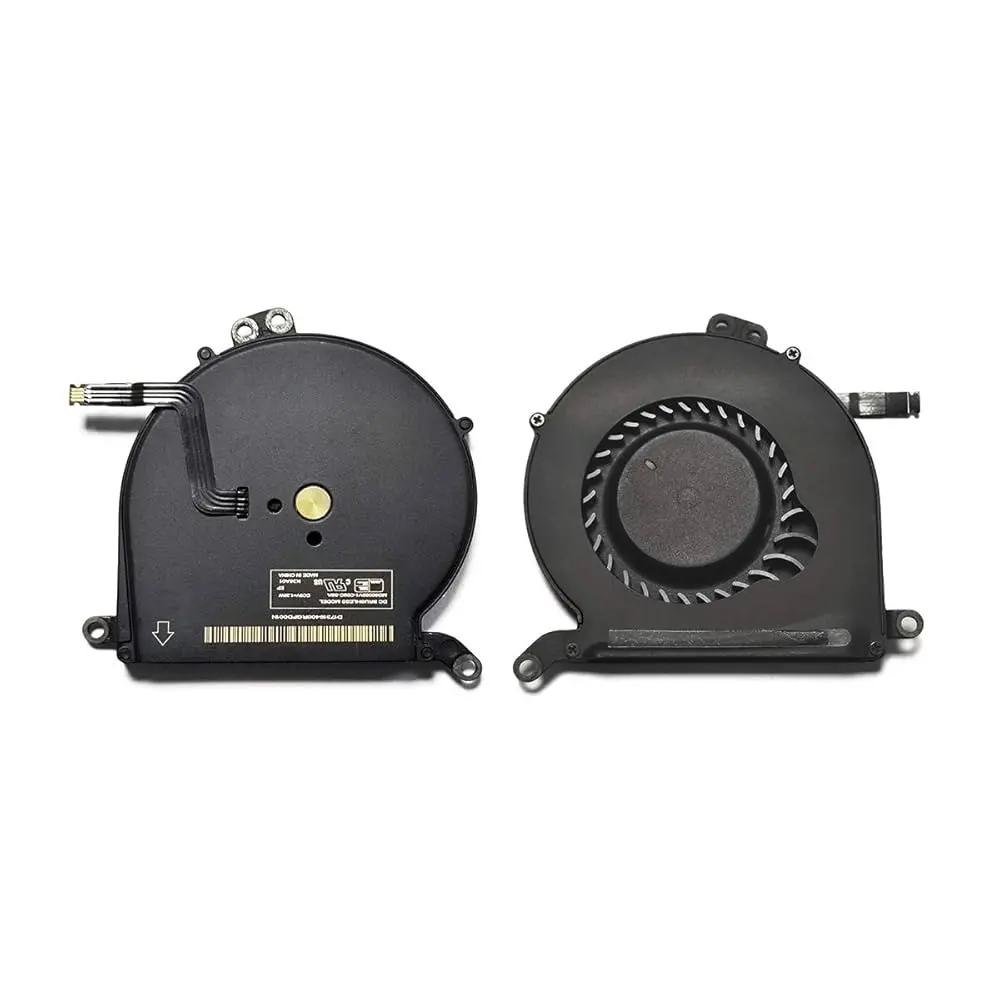 MacBook Repair
When your MacBook begins to sound like a miniature jet engine or runs hotter than usual, chances are its internal cooling system is struggling. If you’re in Midtown Manhattan and your laptop is constantly humming, running warm, or shutting down unexpectedly, the cause is usually dust in the fan and vents or a fan that is wearing out.
We replace worn or noisy fans and clean clogged fans and vents on MacBook Pro and Intel MacBook Air models. Diagnostic $75, credited toward the repair, then a quote you approve before any repair. Most repairs have a 30-day limited warranty.
Get a MacBook fan quote 212-810-6432June–October 2026 at our Midtown store: 44 MacBooks came in for repair and 33 were repaired; the median bill was $425, and the median repair took about 3 days.
Tax is not included, and you see and approve the total price before any work starts.
Battery replacement
Parts and labor included
$189
Keyboard replacement
Parts and labor included
$299
Not in the list? Bring the laptop in and we quote after the diagnostic.
At Quick Fix by iFix, we fix thermal and airflow issues on Apple laptops, from MacBook Pro to Intel MacBook Air models. The diagnostic tells you whether your Mac needs a cleaning or a new fan before you pay for either. For other Apple laptop problems, see our MacBook repair page.
A clogged or failing fan usually gives warning signs well before the Mac shuts itself down. Watch for these:
A steady whoosh under heavy load is normal. A fan that roars during light work, rattles, or stays silent while the Mac gets hot is worth a diagnostic, because heat that cannot leave the case slows the Mac down and stresses the battery and logic board.
Before we suggest any repairs, we start with a full diagnostic to see what’s really going on under the hood. Our techs check everything—from your fan speeds and CPU temps to signs of dried-out thermal paste or blocked vents. We also look at how your Mac handles airflow and whether background apps or dust buildup are making things worse.
A lot of customers ask, “Why is my Mac fan suddenly so loud?” The truth is, it could be several things at once: clogged vents, old thermal paste, poor airflow, or a dead fan. A loud fan is often dust rather than a failed fan, and the diagnostic shows which. We only recommend what your Mac actually needs, whether that’s a deep clean or a full fan replacement.
Replacing a MacBook fan, on a newer M2 model or an older Intel one, isn’t a job for a YouTube video and a screwdriver. The fan sits next to the logic board, the heatsink and thin ribbon cables, and a slip with a pry tool can tear a cable or damage a connector. Improper handling could damage more than it fixes.
If your Mac’s fan runs at full speed even with light work, it’s likely more than dust. Common causes include sensor failure, firmware glitches, or internal hardware issues. The diagnostic checks the fan, its cable and the temperature readings, so the repair fixes the cause and not only the noise. For a Windows laptop, see laptop fan replacement.
The MacBook fan replacement cost depends on the model and generation. The model picker above shows the fan price for your MacBook from our approved price list; a cleaning or other cooling work is quoted after the diagnostic.
We’ll review the condition of your cooling system, test fan RPM under load, and give you a quote to approve before any repair. You won’t be left guessing whether it’s better to clean, adjust, or replace the fan altogether. The diagnostic fee is credited toward the repair.
We service a wide range of Apple laptops, including:
MacBook Air models with Apple silicon and the 12-inch MacBook have no fan. If one of them runs hot, the diagnostic looks at the battery, the board and what is running on it. Whether the fan for your model is in stock comes with the quote, along with the timing.
Can’t get to Midtown? Mail-in repair is available for MacBooks too, with payment by Zelle or PayPal.
A loud or overworked MacBook fan is often just dust. Lint and debris collect on the fan blades and the heatsink fins, so the fan has to spin harder to move the same heat.
If your Mac heats up during simple tasks or the fan roars through a Zoom call, a cleaning is the first thing to check.
What’s Included in a MacBook Fan Cleaning:
If the fan itself still works, a cleaning is often all the Mac needs. Our MacBook cleaning service page has the details.
If your Mac is overheating, making excessive fan noise, or slowing down during basic tasks, it may be time for a fan replacement or a cleaning. Ignoring thermal issues can lead to battery failure, logic board damage, and costly repairs.
Visit Quick Fix by iFix in Midtown Manhattan, near the Empire State Building, or send a request with the form.
Don’t wait for your device to overheat again. Bring it in, and you get a quote before any repair.




 Trustindex verifies that the original source of the review is Google.
 Trustindex verifies that the original source of the review is Google.
 Trustindex verifies that the original source of the review is Google.
 Trustindex verifies that the original source of the review is Google.
 Trustindex verifies that the original source of the review is Google.
 Trustindex verifies that the original source of the review is Google.
 Trustindex verifies that the original source of the review is Google.

Our technicians work on phones, tablets, laptops and computers, and Quick Fix by iFix has 15+ years of repair experience. Complex board and liquid-damage work may go to the iFix repair lab, run by lead engineers with about 15 years at the bench, and your MacBook stays with iFix. You approve the quote before any work starts.
It depends on the repair and on whether the fan for your model is in stock. A cleaning or a fan replacement comes with its timing in the quote, before any work starts.
The price depends on the device and the part. The diagnostic is $75 and is credited toward the repair; then you get a quote to approve before any repair. We won’t add any extra fees or charges later. Most repairs have a 30-day limited warranty.
Often it is dust. Clogged vents and a dusty fan make the fan run loud at high speed, while a worn fan tends to grind, rattle or stop. The diagnostic shows which one it is, and you approve the cleaning or the fan replacement before we start.
Yes. Mail-in is available for any repair, and mail-in payment is by Zelle or PayPal. The diagnostic and the quote work the same way as in the store.
