Category
Computer Repair Shop in Midtown NYC Drone Repair Game Console Repair iPhone Repair Laptop Repair MacBook Repair Phone Repair Tablet Repair in Midtown NYC Watch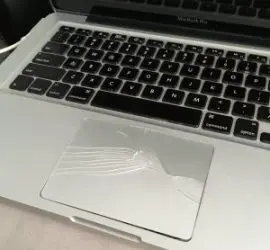 MacBook Repair
When your trackpad stops responding, everything slows down. Delayed clicks, missed taps, or a stuck cursor can disrupt your entire day. NYC professionals and students who rely on their MacBooks for work or school can’t afford the downtime. Quick Fix by iFix offers MacBook trackpad repair and replacement in Midtown NYC, just steps from the Empire State Building, for MacBook Air and MacBook Pro trackpads that won’t click, jump around, or sit raised in the case.
We repair MacBook trackpads that won’t click or track, including trackpads pushed up by a swollen battery, and replace the trackpad or its cable when it has failed. Diagnostic $75, credited toward the repair, then a quote you approve before any repair. Most repairs have a 30-day limited warranty.
Get a trackpad repair quote 212-810-6432MacBook Trackpad Not Clicking or Not Working? We Can Fix That
For many in Midtown Manhattan, a malfunctioning MacBook trackpad isn’t just inconvenient; it disrupts everything. Issues like unresponsive clicks or erratic movement often need a technician to open the case, not hours of online troubleshooting.
Typical trackpad problems we see:
- The trackpad stops clicking entirely, or clicks only in one corner
- The cursor jumps around or freezes
- Pressure sensitivity is off
- The trackpad sits higher than the case, or the bottom case bulges
- The surface appears cracked or damaged
- Scroll and gesture controls don’t respond properly
These symptoms can stem from a swollen battery, moisture exposure, a damaged trackpad cable, outdated software, or worn components. Whether it’s a mechanical failure or a system-level glitch, we tell you what failed and what the fix costs before any work starts. From June to October 2026 the five iFix stores, Quick Fix included, took in 10+ MacBook trackpad repairs.
Swollen Battery Pushing the Trackpad Up? Stop Using the MacBook
On many MacBook models the trackpad sits right above the battery. When a battery cell swells, it presses on the trackpad from below: the click gets stiff or stops, the trackpad looks raised, and the bottom case may bulge. This is a safety issue, not just a trackpad fault. Stop using and charging the MacBook, don’t press down on the trackpad, and bring it in.
In this case the battery is the fix. Once the swollen battery is replaced, the trackpad often clicks normally again; we test it with the new battery in and tell you if it needs anything else. See MacBook Pro battery replacement for the repair itself, and MacBook battery prices by model on our MacBook repair page.
What Causes Trackpad Issues in Apple Laptops?
Newer MacBook trackpads use Force Touch: pressure sensors and a haptic motor simulate the click, so the surface barely moves. That design has more parts that can fail, and anything pressing on it from below changes how it clicks.
Some of the most common causes include:
- A swollen battery pressing on the trackpad
- Internal corrosion from liquid exposure
- Damaged or loose flex cables
- A failed trackpad
- Software conflicts or incomplete updates
- Logic board issues disrupting input signals
After the battery, liquid is the next cause to rule out: a spill can corrode the trackpad, its cable, or the connector on the logic board. If anything was spilled on your MacBook, power it off and bring it in instead of testing the trackpad. Liquid damage repairs carry no warranty. A professional inspection is essential before trying to fix a MacBook trackpad yourself.
How Trackpad Repair Works at Our Midtown Store
You don’t need to ship your MacBook out or wait days for a response. Just steps from Penn Station and Herald Square, we’re easy to reach, even on your lunch break.
Here’s how it works:
- Walk in or send a request with the form on this page. Bring the MacBook and its charger, and tell us if it was dropped or had a spill.
- Diagnostic: we check the battery, the trackpad, its cable, and the software to identify the issue.
- Clear quoting: you’ll know if it’s a settings glitch or a deeper hardware problem, what the repair costs, and when it will be ready. Nothing is done until you approve.
- Repair and test: we check clicks, tracking, and gestures across the whole surface before pickup.
- Pickup, with a 30-day limited warranty on most repairs.
We service MacBook Air and MacBook Pro models, from older unibody MacBooks to Apple silicon models. For other MacBook Air faults, see MacBook Air repair.
How We Approach Apple Trackpad Replacements
Our focus is on long-term reliability, not quick fixes. After diagnosing the issue, we may recommend one or more of the following:
- Battery replacement when a swollen battery is lifting the trackpad
- Trackpad calibration or configuration reset
- Internal cleaning to clear debris or corrosion
- Reconnecting or replacing internal cables
- Full trackpad module replacement if mechanical damage is confirmed
- Software updates, NVRAM/PRAM reset, or SMC reset to resolve firmware conflicts
We also check for related problems, such as a faulty keyboard, that could be affecting trackpad performance.
Fix Mac Trackpad Malfunctions in Midtown NYC
Why do so many locals choose us over big-box repair chains?
- No upselling. If it’s a simple configuration issue, that’s exactly what we’ll fix.
- Clear diagnostics. We find the failed part instead of swapping parts until the problem goes away.
- Experience. Quick Fix by iFix has repaired MacBooks in Midtown for 15+ years.
- Respect for your time. The timing is in the quote, and we call you when the MacBook is ready.
Worried about the cost of MacBook trackpad repair? In some cases, it’s a simple fix that saves you the expense of a full replacement.
Warning Signs of MacBook Trackpad Failure
Trackpads often show early warning signs before completely malfunctioning. Common symptoms include:
- Random or “ghost” clicks
- Gestures working inconsistently
- Noticeable lag with tap-to-click
- Difficulty registering light pressure
- A click that feels stiff or uneven
If you notice these early, back up your MacBook and bring it in before the trackpad stops clicking entirely. A loose cable or a battery that has just started to swell is a smaller job than a cracked or corroded trackpad.
Repair vs. Replacement: What’s Right for You?
We’re often asked whether it’s better to replace a Mac trackpad or try to repair it. The answer depends on what’s causing the issue. Replace it when the glass is cracked, the sensors or haptic motor have failed, or liquid has corroded the trackpad itself. Keep it when the cable is loose or damaged, or a swollen battery is lifting it: then we fix the cause and your existing trackpad stays.
We’ll walk you through the decision transparently and won’t suggest costly fixes you don’t need.
How Much Does MacBook Trackpad Replacement Cost?
The MacBook trackpad repair cost can vary based on the model, extent of internal damage, and whether parts need to be ordered. It also depends on what failed: the trackpad itself, its cable, or a swollen battery. When the battery is the cause, the battery replacement is the repair.
Every repair starts with a diagnostic, so you’ll never be surprised by the final price: you get a quote for your model and part, and you approve it before we begin. Stop by or give us a call to get an honest quote.
Serving Midtown Manhattan and Beyond
Our location supports customers across Midtown Manhattan, including Koreatown, Murray Hill, Chelsea, and Hell’s Kitchen. Walk-ins are welcome during store hours, listed at the bottom of this page.
Get Local MacBook Trackpad Repair in Midtown NYC
If your trackpad is broken, unresponsive, or physically damaged, don’t wait until it causes a complete work stoppage. If it sits raised or the case bulges, stop using the MacBook now. Get accurate diagnostics and local accountability without navigating a sea of generic repair chains.
Walk in or request a quote below; no appointment needed.